
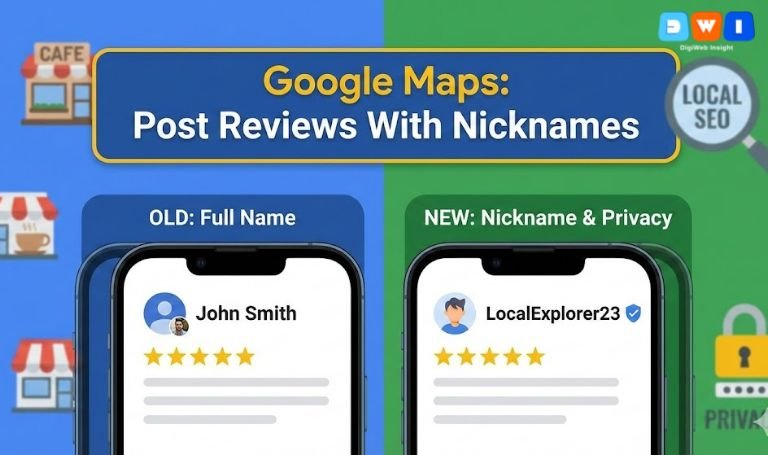
Google Maps Lets Users Post Reviews With Nicknames, and that one update is a big deal for both customers and local businesses. Instead of showing a person’s full Google account name and photo, reviews can now appear under a custom nickname and illustration.
Google announced this as part of a broader Maps update, rolling it out globally on Android, iOS and desktop. Reviewers can choose a display name and image that appear on their public contributions, while Google still keeps everything tied to the real account in the background.
For privacy‑conscious customers, this makes it much easier to leave honest feedback. For businesses, it changes how local reviews, reputation management and local SEO will work going forward.
What Does It Mean When Google Maps Lets Users Post Reviews With Nicknames?
When Google Maps Lets Users Post Reviews With Nicknames, it essentially introduces pseudonymous reviews:
- Customers can turn on a setting that uses a custom name and picture for posting.
- That nickname then appears on their reviews, photos, videos and Q&A posts across Google Maps and Google Search surfaces.
- Behind the scenes, every review still connects to a real Google account, so Google’s spam detection and policy enforcement still apply.
Google’s own documentation explains that users can edit their profile name and picture from their Maps profile, and that these details appear on their public contributions.
In short: the public sees a nickname, Google sees the real account. That keeps some accountability while making reviewers feel safer.
How to Turn On Nicknames for Your Google Maps Reviews
Here’s a simple, up‑to‑date walkthrough based on Google’s help pages and early guides to the feature. Google Help+1
On mobile (Android or iOS):
- Open Google Maps and sign in.
- Tap your profile photo in the top‑right corner.
- Tap “Your profile”.
- Tap “Edit profile”.
- Look for an option like “Use a custom name & picture for posting”.
- Enter the nickname you want people to see.
- Choose an illustration or custom profile image.
- Save your changes.
On desktop:
- Open Google Maps in your browser and sign in.
- Click your profile picture and go to “Your profile”.
- Choose edit profile.
- Turn on the option to use a custom name and picture for posting.
- Add your nickname and choose an avatar.
- Save.
From that point onward, your public reviews will display the nickname, not your real account name.
7 Ways This Feature Helps Real-World Customers
Here’s why customers will actually use the feature now that Google Maps Lets Users Post Reviews With Nicknames.
1. More privacy for sensitive services
People can review clinics, therapists, lawyers, schools and other sensitive services without putting their full name next to deeply personal experiences. That encourages more truthful feedback, especially in privacy‑sensitive industries.
2. Less “review anxiety”
Many users hesitate to share honest opinions because they worry businesses—or people they know—will see their real name. A nickname lowers that psychological barrier and makes leaving reviews feel safer.
3. Safer for parents and students
Parents wanting to review schools or kids’ activities often worry about backlash. Having a nickname option helps them protect their families while still warning or recommending places.
4. More honest negative feedback
Since reviews are pseudonymous instead of fully tied to a public identity, customers may feel more comfortable writing balanced negative feedback rather than posting nothing or leaving only star ratings.
5. A consistent identity without oversharing
Reviewers can build a recognizable persona (“CoffeeNerd23”, “DelhiFoodie”) without linking it directly to their government name, workplace or personal details.
6. Better control over your online footprint
Because the nickname and illustration sit between your reviews and your real profile name, you gain extra control over what pops up when someone searches your name.
7. Encouragement to participate more
All of this together means more people are likely to leave reviews at all—especially in categories where reviews used to be scarce because of privacy concerns.
7 Ways Google Maps Lets Users Post Reviews With Nicknames Changes Local SEO
For businesses and marketers, Google Maps Lets Users Post Reviews With Nicknames isn’t just a UX tweak; it touches almost every part of your local SEO strategy.
1. Expect more reviews in “sensitive” niches
Legal, healthcare, financial and other privacy‑sensitive verticals may see a spike in review volume, because people finally feel safe enough to speak up.
2. Review sentiment may become more honest
Because the social pressure of putting your real name next to criticism is lower, reviews may become more direct. That’s good if you offer great service, but it also exposes weak spots more visibly.
3. Profiles with more nuanced feedback can rank better
Google’s local algorithms look at both review volume and review quality (length, detail, recency). Nicknames can encourage longer, more descriptive reviews—which can help your local rankings over time. W3era.com
4. Reputation patterns matter more than reviewer identity
Businesses will have less ability to “eyeball” who a reviewer is. You’ll need to focus more on patterns—recurring issues, themes and star‑rating trends—rather than trying to guess who left what.
5. Review management tools must adapt
If you use reputation‑management software or workflows, update them to account for nickname‑style profiles. The process of reporting spam, replying and tracking sentiment is the same, but the visual identity of reviewers changes.
6. Increased spam risk, but with guardrails
Any anonymity feature raises concerns about fake reviews. Google has stated that existing protections still apply and that reviews remain tied to accounts, even with nicknames. That means suspicious patterns can still be detected and reported.
7. New messaging in your review requests
Smart businesses will start mentioning the nickname option in review‑request emails and SMS:
“You can even use a nickname when you review us on Google Maps if you’d like extra privacy.”
That small reassurance can significantly increase your review conversion rate.
Best Practices After Google Maps Lets Users Post Reviews With Nicknames
To stay ahead, adjust how you think about Google reviews now that Google Maps Lets Users Post Reviews With Nicknames.
1. Update your review request templates
Add a simple line explaining that customers can use a nickname and illustration. This reduces friction, especially for sensitive services.
If you’d like help optimising your review funnels and local strategy, partnering with an affordable SEO agency in the USA can help you implement these changes across locations and campaigns.
2. Double down on high-quality service and CX
Nicknames make it easier for customers to be blunt—good and bad. Strong service, clear communication and smooth digital experiences (including a fast, user‑friendly website) are more important than ever.
If your site needs an upgrade to match your review reputation, explore professional web design & development services to improve speed, UX and conversion paths.
3. Monitor reviews and reply consistently
Continue to:
- Check new reviews regularly.
- Respond to both positive and negative feedback.
- Thank customers for specific details they share.
- Move sensitive conversations to private channels when needed.
Whether reviews show a full name or a nickname, timely, human responses signal trustworthiness to both users and search engines (a key part of Google’s E‑E‑A‑T principles).
4. Use insights from nickname reviews to improve operations
Because people may feel freer to speak their minds, you’ll likely see:
- Clearer feedback about staff behaviour
- More honest comments about pricing and wait times
- Detailed notes on the environment or safety
Feed these insights back into training, processes and site content (FAQs, policies, landing pages).
5. Strengthen your broader local marketing
Reviews don’t exist in isolation. Combine this update with:
- Optimised Google Business Profiles
- Local content and city‑specific landing pages
- Smart paid search campaigns that align with your review messaging
If you’re running or planning ads, align them with your review strategy using targeted PPC marketing campaigns to capture ready‑to‑buy traffic.
6. Learn from trusted external resources
To stay aligned with best practices as the feature evolves, it’s worth following:
- Search Engine Journal’s coverage of Google Maps nicknames Search Engine Journal
- Search Engine Roundtable’s breakdown of reviewer nicknames and insider tips Search Engine Roundtable
- Google’s own Maps profile help documentation for official guidance. Google Help
These sources will help you track changes, spam‑fighting tactics and new local‑search features that interact with reviews.
7. Make DigiWebInsight your long-term growth partner
If this all feels like a lot to juggle—review strategy, local SEO, website UX, paid campaigns—you don’t have to do it alone.
You can always turn to DigiWebInsight as your strategic partner for SEO, web design and performance marketing, while you focus on delivering great real‑world experiences that earn those (nicknamed) five‑star reviews.
Final Thoughts: Turn Nickname Reviews into an Advantage
Google Maps Lets Users Post Reviews With Nicknames, but it hasn’t removed accountability. Google still knows who is behind each review and continues to run anti‑spam systems in the background.
For customers, this change means more privacy and confidence. For your business, it’s a nudge to:
- Invite more reviews
- Improve the experience behind those reviews
- Treat feedback (even from nicknames) as a powerful data source
If you adapt early—updating templates, polishing your Google presence and aligning your broader digital strategy—you can turn this update into a genuine competitive edge in local search.